How to set up the perfect home office
By Melanie Clark•Last updated Aug 1, 2022
Last updated Aug 1, 2022
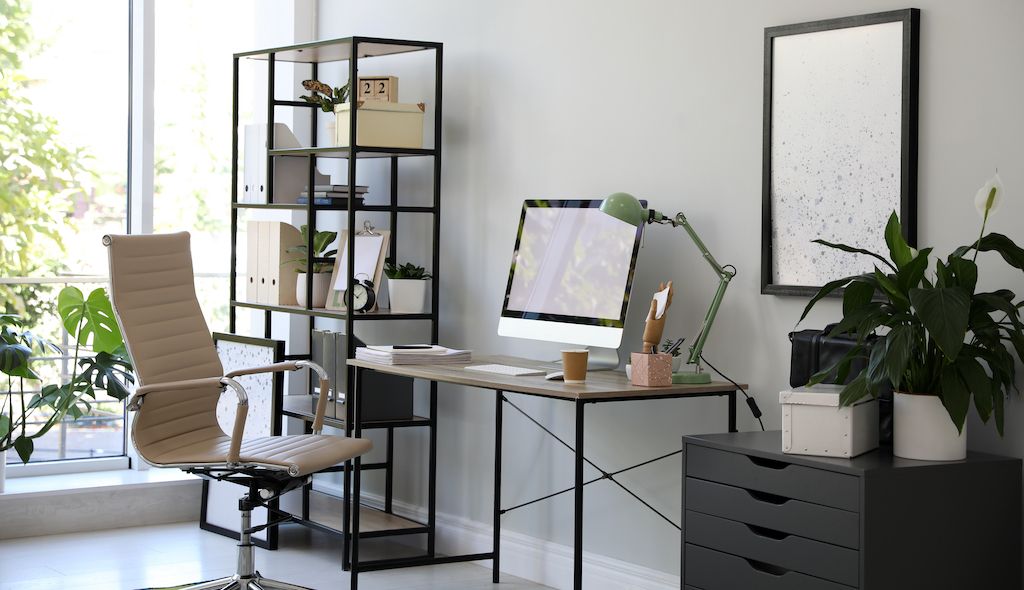
So many of us work from home these days. And that can be great. From increased flexibility and productivity to greater work-life balance, there’s a lot to love about working from the comfort of your very own home.
If you’re new to working from home — or never really got around to setting up an office or work station — this guide will walk you through the entire process.
Picking the right area
Maybe you have an unused room down the hall. Others may need to get more creative and carve out a nook big enough for a desk. This could be an empty corner in the living room, a loft area without a specific purpose, or even a space in the basement. As long as it can fit a bit of furniture and has an outlet nearby, you can make it work for you.
When choosing an area for your home office or work zone, two of the most important considerations are the size and shape of the space. At minimum, it should fit a small desk, your computer, and an ergonomic chair. You’ll also want the area to be open enough that it doesn’t block walkways or disrupt the flow of your home.
It’s also smart to choose a space that isn’t busy. A hallway or kitchen, for example, will likely have foot traffic and chatter that could distract you. No one wants someone rummaging around for an afternoon snack while they’re leading a Zoom meeting.
If you can find a space that can be shut off from other areas of the home with doors or a privacy screen, you’ve hit the home office jackpot.

If you need to create a zone in a room that serves another purpose, like a guest room, think about how the two functions can work together seamlessly. In a guest room, it might be as simple as switching to a sofa that converts into a bed when guests stay over. Not only does this free up space, but it also makes your coffee breaks extra cozy.
When choosing a space for your office, make sure your computer can be placed somewhere without excessive glare. If that’s not possible, try installing some blinds or semi-sheer curtains.
Other important considerations for your office setup include:
- A strong Wi-Fi signal and fast internet access
- Access to electrical outlets so you can charge and operate your laptop, printer, or any other equipment
- Sufficient natural lighting, or at the very least, overhead lighting
If you’re missing any of these, there are usually ways around them. An electrician can install extra outlets or lighting, for example, and your internet provider can help improve Wi-Fi coverage.
What to include in your home office
A worker is only as good as their tools. This is especially true when setting up a home office, so be sure you have the right equipment on hand to get the job done.
Here are the most important things you should have in your home office:
A height-adjustable desk

A height-adjustable desk can help increase productivity, improve mental focus, give you more energy, and promote physical wellbeing. It works as both a sit-down and stand-up desk, making for a flexible, healthier working style.
The perfect computer setup

If you use a PC, you’ll want plenty of space for your monitor, motherboard, keyboard, and mouse. If you can, use a laptop to save space and give yourself more flexibility. Either way, make sure your setup lets you work without slouching or craning your neck.
Use a laptop or keyboard stand to place these items at their optimal height. You might even invest in two monitors for the added ease of a dual-screen setup.
Additional storage

Most standing desks don’t come with enough storage, so you’ll also want to add a cabinet, chest of drawers, or shelving. This will help you stay organized while keeping your desk free from clutter.
An ergonomic chair

When you’re sitting at your desk, you’ll need a comfortable, ergonomically designed chair to keep your back and neck in their optimal positions. This can help prevent muscle strain and aches, both of which can affect your productivity and wellbeing.
Great lighting

Good lighting is essential if you’re going to get meaningful work done. Natural light is ideal, but if you need to add extra lighting, don’t worry.
One good, adjustable desk lamp is table stakes (see what we did there?). Consider getting one that’s cordless if you’re low on outlets. You may also want to find a desk lamp that’s smart, meaning the brightness will adjust based on the light in your office.
If you need more than a desk lamp, chat with a light installation professional near you. They can help you install lighting in your ceiling, on your wall, or even in your shelves and cabinets.
A power strip to maximize your outlet

Even the most basic home office will require multiple items being powered at once. To maximize a single electrical outlet, use a power strip that lets you charge several items at the same time.
This also makes energy saving easier, as you can simply flick a single switch at the end of the day to turn off all your equipment. Just be careful — too many cords can be a tripping and safety hazard.
A whiteboard and markers

Even the smallest whiteboard can help you keep on top of important things, like that project deadline that’s quickly approaching. Attach the whiteboard to your wall using an adhesive hook or simply place it on a stand on your desk. It’s also a great way to cut down on using excess sticky notes.
A desk calendar

Consider adding a calendar somewhere within eyeshot so you can keep track of important dates. An option that gives you a monthly or yearly view will help you see what project deadlines are on the horizon.
Plenty of office stationery and supplies

Stock your office drawers with all the stationery you could need, like printing paper, notebooks, pens, pencils, erasers, paper clips, a stapler and staples, scissors, a hole punch, highlighters, and anything else you may need to keep on hand. No one wants to pause halfway through important work to go search for a pen.
A printer with scanning and photocopying functions

Just because you’re working from home doesn’t mean you should go without printing, scanning, or photocopying capabilities. The best home office setup will also be equipped with a machine that can do it all. In the past, this technology was bulky and hard to store, but these days, you can fit one neatly on a shelf.
Noise-canceling headphones

Even if you’re mostly alone at home during the workday, there are still plenty of distractions, like barking dogs and playing children. A family member or roommate might be home sick and watching TV in the next room, or the neighbors might decide to do some landscaping during your weekly team meeting. This is where a pair of noise-canceling headphones comes in handy. Plus, they’re usually small enough to store in a drawer.
Home office decorating ideas
How will you come up with the next inspiring idea in an uninspiring office? Once you’ve filled your workspace with the right tools and equipment, it’s time to style it. Consider these top home office decor tips.
Tip #1: Bring in the greenery

Did you know having plants indoors can reduce your stress levels? They may also boost productivity and help you concentrate. Plants help create a more peaceful home office setup and add visual appeal. That’s a win-win.
When buying plants for your home office, make sure they’re suited for indoors and can tolerate the light levels in your space. Some popular indoor plants to consider include snake plants, peace lilies, and spider plants.
Tip #2: Paint the walls

If your home office walls are looking a little lifeless, a few coats of paint can do the trick. Getting crisp lines and making everything even can be a challenge, so consider hiring a professional interior painter to do the job right.
You can use color to evoke particular emotions. A pop of yellow may boost creativity, joy, and energy. Too much, however, can be distracting. The same rings true for blue (which can promote orderliness and serenity), as well as green (which enhances feelings of refreshment, peace, and renewal).
Want in on the trends? Consider Eggshell Blue, Granite Green, or Cornsilk — all of which were chosen among the top Pantone color palettes of 2022. If you’d rather stick with white, that’s OK too. A blank slate can be just the thing to spark new ideas.
Tip #3: Install some wall shelves

Wall shelves give you extra storage without taking up valuable floor space, which is especially important in a small home office. They’re a great display for items that inspire you or boost your productivity, such as books, your favorite photos, or special keepsakes.
Consider shelves made from polished wood for something more traditional, or keep it modern with glass or floating shelves. A local handyman can help hang them correctly.
Tip #4: Decorate your walls with art and photos

Wall art and framed photos are a vital part of any home office design. They can instantly transform the room’s look and feel. If your home office space has no windows, a framed print on your wall can give you a beautiful scene to look at. Depending on their color scheme or style, they can also dramatically change the mood of your space.
For a calm home office, choose art with a soothing color palette or tranquil scene. Black-and-white photography, on the other hand, is clean and classic. You might even hang your favorite photos with loved ones to lift your mood. Add word art featuring inspirational quotes or any awards and accolades you’ve earned to stay motivated.
Tip #5: Include a few desk accessories

While it’s a good idea to keep your desk space minimal and clutter-free, it doesn’t have to be devoid of personality. Placing a few special items on the surface can make your office feel more you. Whether it’s a cherished photo, a beautiful clock, a zen sandbox, a Newton's cradle, your favorite figurine, or even a vase full of fresh flowers, it’s those little touches that make a big difference in your home office design.
Tips for making your office productive and cozy
Here’s how to make your workspace comfortable — so you actually enjoy working in it:
Tip #1: Invest in ways to heat or cool your office

When you have greater control over your office’s temperature in summer and winter, it instantly makes it more comfortable. If your home isn’t already equipped with central AC and heat, you can buy an electric fan or space heater. You may even want to consider installing a ceiling fan.
Just keep in mind that constantly running these items in hot or cold months can drive up your energy bill. Therefore, look for ENERGY STAR certified products, and do your research to determine which products are best suited to your home, such as gas versus electricity.
Tip #2: Limit any surrounding visual distractions

We mentioned noise-canceling headphones as a home office must-have, but there are some other things you can do to minimize distractions and boost productivity.
First, keep TVs and gaming consoles out of your office, if you can. Also, make sure your windows are fitted with curtains or blinds. This helps you shut out visual distractions and block blinding morning light or hot afternoon sun.
Tip #3: Add warmth with soft furnishings

The beauty of a home workspace is that it can achieve a level of coziness that a corporate office cannot. One of the easiest ways to do this is by adding soft furnishings, such as floor rugs, cushions, and throw blankets. Not only do they add decorative flair, but they also create a feeling of warmth and comfort within your space.
You can place a floor rug underneath your desk to further define the zone. Additionally, a chair or couch adorned with cushions and a throw rug makes everything feel more inviting.
Tip #4: Add a comfy couch or chair

Consider adding extra seating if you have the space. Whether it’s an armchair or a couch, having this additional seating has its benefits. It gives you a space to sit for less formal duties, like remote drinks on a Friday with coworkers, as well as a cozy area to sip your morning coffee and catch up on emails.
Tip #5: Create uplifting aromas with a diffuser or scented candles

Studies show that certain aromas, such as essential oils, can boost our mood, relax our minds, and enhance our cognitive function. This makes a diffuser or scented candle a wonderful addition to your office, especially for creating a cozier space and boosting productivity.
To reduce stress, embrace lavender. To improve concentration and memory, place a few drops of rosemary oil into your diffuser. The flicker of a candle or rising steam from a diffuser is a one-way ticket to tranquility.
How to keep your home office clean and clutter-free
It’s one thing to set up a home office that’s organized and tidy, but another thing entirely to keep it that way. Here are the most effective ways to keep your home office looking good all year round.
Tip #1: Regularly dust every surface
It doesn’t matter how clean you try to be — dust loves to accumulate. To prevent the dust in your home office from getting out of control, wipe every surface regularly with a microfiber cloth. Dusting also creates a healthier environment to work in and breathe in.
If you find it hard to get on top of your office’s dust problem, consider hiring a professional cleaner to work their magic.
Tip #2: Keep your office floors clean
Having clean floors can make your entire office space feel fresher and more inviting. Aim to vacuum or mop once a week.
Tip #3: Frequently wipe down your electronic devices
Have you noticed how quickly device screens fill up with fingerprints? Even your keyboard and mouse are likely to get grimy throughout the week. Keep your devices looking their best by frequently wiping them down with a moist microfiber cloth.

Tip #4: Keep your windows clean and streak-free
If you’re fortunate enough to have at least one window in your home office, you’ll want to keep it looking its best. Start by removing any dust on or around your windows, then use a mixture of vinegar and warm water for a natural window cleaning solution.
If your home office space contains any large or hard-to-reach windows, a professional window cleaner can help.
Tip #5: Perform regular declutter sessions
By the end of the week, you might find that your desk is covered in extra documents, books, or other bits and pieces. Likewise, your shelves may have started accumulating clutter that doesn’t have a home.
Regular decluttering is necessary to stop your office from turning into a total mess. Start by organizing any items on your desk that don’t need to be there. Then address the other areas of your office that could use a tidy-up.
If your work-from-home office becomes overwhelmingly cluttered, consider hiring a professional home organizer to help you remove junk and create a better organization system.
Find pros to help create the perfect home office
Need help putting your home office together? Use Thumbtack to find pros who can help you assemble office furniture, paint the walls, install lighting, organize your office, keep it clean, and so much more.
FAQs
How do I set up a home office in a small space?
If you’re unable to dedicate an entire room to your home office setup, then a quiet nook in a larger area such as your living or dining room is the next best thing. Measure the zone to determine what size desk you can place there, or if space is very limited, consider installing a fold-down desk instead.
If you have little floor room for storage like cabinets, make use of vertical storage solutions such as wall shelves. Also, avoid using a big or bulky desk chair. Instead, opt for a slimmer, yet ergonomic, design.
If possible, try to close off the space for more privacy and fewer distractions. A privacy screen or curtain can do the trick.
Where should a desk be placed in a home office?
The best work-from-home desk setup places the desk in the center of a room facing the entrance. Of course, this isn’t always possible in a limited space, so a desk looking out toward a window or facing the wall within a smaller nook can also be effective.
At the end of the day, you’ll want to place your desk in the most accessible and comfortable spot within your space. Ideally, it shouldn’t be obstructed by doors, stairs, or other pieces of furniture.
How it works.

Search.
Browse profiles, see prices and use filters to find pros who match your project.

Chat.
Contact the pros you like to discuss project details.

Hire.
Check pro availability and book appointments right in the app.
Find local pros for your project
Tell us what you're looking for and we'll show you pros right for the job, with prices.